


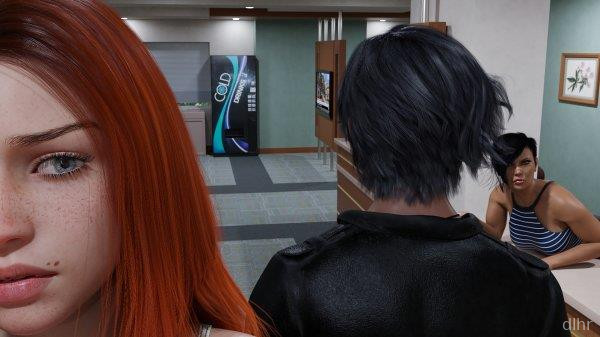

Summers Gone Game on Android – first impressions
Summers Gone is one of those slow, story-heavy visual novels where you mostly sit back, read, and let the atmosphere sink in. On Android it feels like reading a graphic novel with extra drama and choices sprinkled on top. You’re not mashing buttons here; you’re following a character through memories, relationships, and a lot of quiet moments.
The vibe is pretty relaxed. You tap through dialogue, watch scenes play out, and every now and then you pick how the main character reacts. It’s more like watching a show on your phone than playing a traditional game, which is exactly what some people want after a long day.
On mobile, the pacing actually works well. You can run a chapter or two while commuting, then put it away. No stress, no timers, just a moody story about past summers and how they still mess with the present.
Main things Summers Gone brings to the table
1. Story-focused gameplay where reading and choices matter more than reflexes, so you can play it like an interactive novel on your Android phone or tablet.
2. Character-driven narrative that leans on relationships, conversations, and emotional beats rather than big action scenes.
3. Simple tap controls that work fine one-handed; you mostly tap to advance text and pick from a few dialogue options.
4. Scene-based structure that makes it easy to stop after a chapter and pick up later without forgetting what was going on.
5. Visual presentation that favors detailed character art and backgrounds over flashy effects, which keeps it decent even on mid-range devices, though the download size can be a bit chunky for what is basically a reading game.
Where Summers Gone feels strong
The big strength of Summers Gone is its commitment to story. It doesn’t pretend to be an action game; it just leans fully into being a visual novel with a slower burn and a lot of dialogue. If you enjoy getting attached to characters and watching them mess up, grow, and overthink everything, it hits the right notes.
Another thing I liked is the pacing of scenes. Conversations have room to breathe instead of rushing you to the next big twist. That slower rhythm might bore someone looking for quick hits, but for people who like long-form stories, it’s a plus.
On Android specifically, the UI is laid out in a way that doesn’t get in the way. Menus are straightforward, text is readable, and you’re not hunting through tiny buttons to save or load. It feels like the devs actually tested it on a phone, not just ported a PC layout and called it a day.
There are a few rough edges though. Some scenes can feel repetitive if you binge a lot in one go, and because the game is so text-heavy, any small typo or awkward line stands out. It’s not a dealbreaker, but you definitely notice.
How the gameplay flows in day-to-day use
A typical session in Summers Gone starts with you loading into the latest chapter and catching up on the last few lines of dialogue. Within a minute you’re back into reading mode, tapping the screen to move through conversations and inner monologue.
Most of the time, you’re just moving forward line by line until a choice pops up. Those decisions are usually about your attitude or how you respond to another character, and they nudge the story in slightly different directions. Nothing complicated control-wise; it’s all very relaxed.
Performance-wise, it runs smoothly on Android because there’s not much that can lag. It’s mostly static backgrounds and character art, with occasional transitions. The only thing to keep an eye on is storage space, since visual novels with a lot of images and scenes can eat up a few gigabytes.
It’s easy to squeeze in short sessions. You can read through a scene while waiting in line, lock your phone, and continue later without losing your place. Just be aware that long reading sessions will keep your screen on for a while, so battery drain is about what you’d expect from any reading or streaming app.
Final thoughts on Summers Gone
Summers Gone is made for people who like story first and gameplay second. If you want a visual novel on Android that you can just sink into and follow at your own pace, it’s a solid pick, even with a few slow or repetitive stretches.
If you’re hoping for lots of interaction, mini-games, or constant plot twists, you’ll probably bounce off it. But for anyone who’s happy treating their phone like an e-reader with more drama and artwork, Summers Gone does the job nicely as a quiet, character-focused game.







Comments