

SocialTech VPN App Introduction
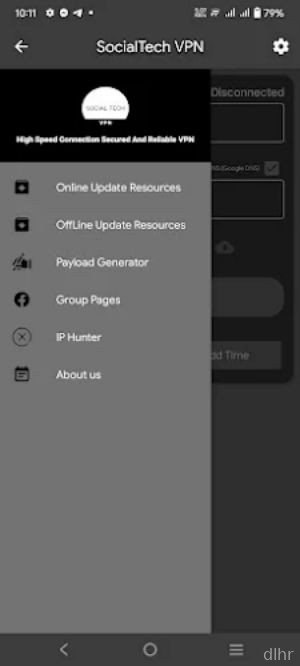
SocialTech VPN is built for Android users who just want a simple way to stay private and access blocked content without messing with complicated settings. Instead of drowning you in menus, it focuses on quick connections, stable servers, and a clean layout that even non-techy users can figure out in a minute.
Once installed, SocialTech VPN can help hide your IP address, secure your data on public WiFi, and route your traffic through different regions so you can reach sites and apps that might be restricted on your network. It aims to be a daily-use tool rather than something you only open in emergencies.
SocialTech VPN App Features
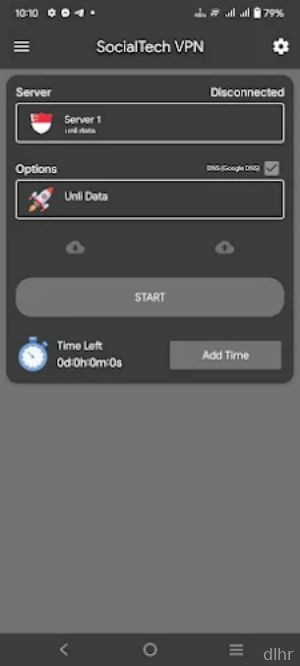
1. One-tap connection: Connect to the VPN with a single tap, without digging through confusing options.
2. Server selection: Choose from different regions so you can access content that might be blocked in your country or on your local network.
3. Encrypted tunnel: Protect your browsing data from snooping on public WiFi, hotspots, and shared networks.
4. Background protection: Keep the VPN running quietly in the background so your connection stays secure while you use other apps.
5. Data-saving focus: Designed to work efficiently so it does not chew through more data than necessary while connected.
SocialTech VPN App Highlights
Fast connection speeds -> SocialTech VPN is tuned to connect quickly and keep your browsing, streaming, and chatting feeling smooth instead of sluggish.
Beginner-friendly layout -> The interface keeps things minimal, making it easy for first-time VPN users to understand what is going on.
Flexible usage -> Use it for social media, messaging apps, browsing, or streaming platforms that might be limited on your network.
Low-friction setup -> No long onboarding or complicated registration steps, so you can get from install to secure in just a few taps.
Always-on privacy -> Once active, it helps keep your IP hidden and your traffic wrapped in encryption across most of your apps.
SocialTech VPN App Usage
Open the app and tap the main connect button to quickly secure your connection without adjusting advanced settings.
Pick a region or server location from the list when you need to access content that is blocked or limited where you live.
Check the connection status indicator before you start streaming or logging into sensitive accounts to confirm the VPN is active.
Let the app run in the background while you browse, chat, or watch videos so your traffic stays protected the entire time.
Disconnect from the VPN when you no longer need it, especially if you want to switch back to your normal, direct connection for local services.
SocialTech VPN App Conclusion
SocialTech VPN aims to be that straightforward Android app you install once and rely on whenever a network feels sketchy or a site refuses to load in your region. It focuses on quick access, clear controls, and practical privacy for everyday use rather than overwhelming you with technical jargon.
If you are tired of cluttered VPN apps and just want a tool that helps you browse more freely and securely, SocialTech VPN is worth trying on your phone or tablet. Use it to protect your data on public WiFi, hide your IP address, and reach the content and apps you actually care about without turning it into a full-time tech project.





Comments